For podcasters
A week of clips from every episode, without an editor
Paste the episode's YouTube link or upload the video. Clyper finds the moments people share, frames host and guest as each one talks, captions every word and hands you up to 30 vertical clips for TikTok, Reels and Shorts. An hour-long episode is about $1.90 on Pro.
- No watermark
- 1080 × 1920 exports
- Captions in 50+ languages
- Up to 30 clips per video


How it works
- 1
Add the episode
Its YouTube link, a Riverside or StreamYard export, or a Drive or Dropbox link: up to 4 hours.
- 2
Get the clips
The moments that stand alone, cut on whole sentences, framed on the speaker and captioned, best first.
- 3
Post the week
Fix a guest's name, download the MP4s and post one a day until the next episode.
What you get
- Host and guest, framedIt follows whoever's talking and cuts to the other the moment they answer.
- Whole thoughts20 to 60 seconds, from the line that hooks to the payoff.
- The best one firstA hook score on every clip, so the episode's strongest moment leads.
- Names spelled rightCaptions in 50+ languages; fix a guest's name or a brand once in the editor.
- Your show's lookOn Pro and Studio, up to 10 caption styles in your show's colors.
- Your back catalogOn Studio, paste 10 old episodes' links at once.
“Went from an hour per clip to under 2 minutes. Still can’t believe it.”
 Hom Nurkil, solo creator · 90 sec/clip
A podcaster's week with Clyper
- Publish the episode as you do now, on YouTube or wherever you host the video.
- Paste its link (or upload the export) and choose how many clips: up to one for every 2 minutes, so an hour-long episode gives up to 30.
- Pick the week's clips from the top of the list, fix a name if the captions got one wrong, and download them.
- Post one a day on TikTok, Reels and Shorts, each pointing back to the full episode, until the next one comes out.
Clips are how new listeners find a show: a stranger hears one great answer and goes looking for the rest. How to turn that into subscribers is in how to grow a podcast with clips and how to promote a podcast.
Two people, one vertical frame
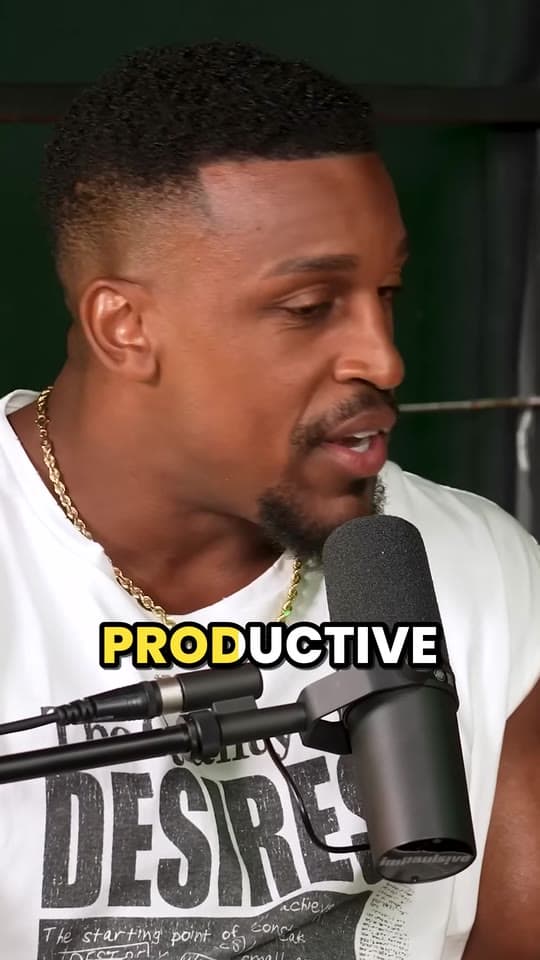
A podcast is shot wide, with host and guest side by side or on their own cameras. Cropped to 9:16, there's room for one. Clyper decides shot by shot, the way an editor would:
- One person in the shot: it follows them, holding still while they stay near the middle.
- People close enough to fit: it keeps them together.
- Too far apart: it frames whoever's talking, judged by their mouth moving, and switches from the moment the other person starts, not a second late. It cuts rather than pans, so the frame never drifts across the table.
Recording remotely? A speaker view or side-by-side layout gives it clear faces to follow: see Riverside, StreamYard and Zoom. More on the framing on auto reframe.
What clips cost you without it
Your time. In the worked example in how to clip faster, 10 clips from a two-hour podcast take about 3 h 10 min by hand, even done the fast way. With Clyper, the finding, cutting, framing and captioning are done for you, and checking the clips and writing the posts takes about 1 h 20 min. Those are assumed minutes, not measured ones: time your own.
An editor. When we checked on October 27, 2026, Upwork put video editors at $6 to $25 an hour typically, with a mid-tier median of $40, and two short-form editing listings on Contra started at $40 and $50 a video. A good editor brings judgment Clyper doesn't, so if you have one, let Clyper make the first cut and spend their hours on the episode itself.
Clyper. An hour-long episode uses 60 credits: $1.90 on Pro or $1.44 on Studio, billed yearly, for up to 30 clips. Check your own numbers in the AI clipping cost calculator.
Which plan fits your show
A credit is a minute of video, however many clips you take, so the plan follows how much you publish:
| Your schedule | Credits a month | Plan | Price | An episode |
|---|---|---|---|---|
| One 45-minute episode a week | 195 | Starter | $20 a month | $4.50 |
| One 1-hour episode a week | 260 | Pro | $19 a month billed yearly | $1.90 |
| Two 1-hour episodes a week | 520 | Pro | $19 a month billed yearly | $1.90 |
| One 2-hour episode a week | 520 | Pro | $19 a month billed yearly | $3.80 |
| A 1-hour show every weekday | 1,300 | Studio | $48 a month billed yearly | $1.44 |
Starter, at $20 a month, has one caption style; Pro adds every style, the brand kit and a hook headline on each clip, and billed yearly it costs less a month than Starter. Clipping the back catalog too? Studio queues 10 YouTube links at a time. Compare them on the pricing page.
Wherever your episodes are
- On YouTube: paste the episode's link, public or unlisted. See podcast clips.
- In your recording app: export and upload (MP4, MOV, WebM or MKV, up to 4 GB) from Riverside, StreamYard or Zoom.
- On Spotify: Spotify's download gives you the audio, so start from the original video file, as Spotify video podcast to clips explains.
- In a shared folder: paste a Google Drive or Dropbox link to the file.
- Audio only? Clyper clips video. For an audio show, the free audiogram maker turns a moment into a waveform video, and how to start a video podcast covers adding cameras.
Make your guests your distribution
A guest with a great clip of themselves will share it. Send each guest their best two or three clips the day the episode goes out, tag them in the posts, and they reach an audience you don't have yet. Clips are clean MP4s with no watermark, so they can post them as their own. Finding guests worth clipping is in how to get podcast guests. Want clippers to post your clips for you? See how to run a clipping campaign.
What it costs
A credit is a minute of video, so a plan is how much video you can clip in a month, however many clips it makes.
Starter
$20/mo
200 minutes, about 100 clips
Pro
$19/mo yearly
600 minutes, about 300 clips
Studio
$48/mo yearly
2,000 minutes, about 1,000 clips
Also as 2× or 4×, for more of both
Questions
What is the best AI tool for podcast clips?
For video podcasts, Clyper: it picks the moments from the whole episode, cuts them on whole sentences, frames host and guest as each one talks, captions every word and scores each clip's hook, up to 30 clips an episode with no watermark.
Is there a free podcast clip maker?
Clyper is paid, from Starter at $20 a month, with no free plan or trial. Free tools here handle single steps in your browser: the audiogram maker for audio clips, video to text for a transcript and the video highlight finder for an episode's liveliest moments.
How much does Clyper cost per episode?
An hour-long episode uses 60 credits, a credit a minute, however many clips you take: about $1.90 on Pro billed yearly ($19 a month for 600 credits). Every video uses at least 10 credits, and one that gives no clips has its credits returned.
Does it work with two or three people on camera?
Yes. It keeps people together when they fit in the vertical frame and follows whoever's talking when they don't, switching as the conversation moves.
Can Clyper clip an audio-only podcast?
No, it clips video. For an audio-only show, turn a moment into a waveform video with the free audiogram maker.
Can I fix a guest's name in the captions?
Yes. Edit any word in the editor, trim to the word or extend either end by up to 15 seconds. Edits use no credits.
Clip this week's episode
Paste its YouTube link or upload the video. Clyper frames host and guest, captions every word and gives you up to 30 clips, best first: a week of posts from one link.


Learn more
- GrowingHow to grow a podcast with short clipsWhat to clip from each episode, how to turn viewers into listeners, a rhythm to post on, and a workflow for a weekly show.5 min read
- GrowingHow to promote a podcast: every channel that worksEvery way to promote a podcast, what each costs in time and money, what it grows, and how to tell which one is working.12 min read
- Getting startedHow to start a video podcast: setup, publishing and clipsThe setup for one, two or more people, recording remotely, editing, publishing on YouTube and Spotify, and growing it with clips.10 min read



Free tools
- Audiogram makerTurn a podcast's audio into a video: its cover, a waveform that moves with the sound and captions from the speech, as a 9:16, square or 16:9 MP4.
- YouTube timestamp generatorMake chapters for a YouTube description: mark them as the video plays or from its transcript, checked against YouTube's rules.
- AI clipping cost calculatorSee what AI clipping costs you on Clyper for the video you clip each month: the plan that covers it, and the cost per video, clip and hour.